Geosetta API Documentation
Commercial API access is available for a data access fee. Access is free for university research and public-interest projects. Get in touch via our contact page and we'll respond within a few days.
Geosetta provides programmatic access to 2,100,000+ public boring logs, ML-based subsurface predictions, PDF-to-DIGGS extraction, and more. All of this data is free to everyone on the website; the API delivers the same public data programmatically. Commercial API access carries a data access fee that recovers infrastructure costs, while universities and public-interest projects receive access at no charge. API access fees are payments for services, not charitable donations.
Quick Navigation
- Rate Limits & Quotas
- DIGGS API
- VLM Page Classification
- VLM Boring Log Extraction
- Async PDF→DIGGS Extraction
- DIGGS Viewer
- Subsurface Summary Reports
- Borehole Data Access (AGS / DIGGS / PDFs)
- Location Precision & Reporting a Bad Point
- Request Data for an Area
- Historic Data in Radius
- Subsurface Predictions
- Project Visualization Link
- Distance from Trained Point
- PDF to DIGGS Conversion
- VLM Extraction Issue Reporting
- Seismic Site Class Prediction
- Vector Tiles (Borehole Streaming)
- Data Providers & Test Types
- Disclaimer & Terms of Use
Disclaimer & Terms of Use
Every Geosetta deliverable carries the legal disclaimer below. By calling any endpoint you accept these terms, and you must keep the disclaimer attached to any Geosetta predictions, models, or data outputs you redistribute. Depending on the response type, the disclaimer is delivered as:
- JSON responses — a
disclaimerfield (a string, or an object withtext,terms_url, andmust_accept). - Zip / file responses — a
DISCLAIMER.txtentry inside the archive, and anX-Geosetta-Disclaimerresponse header. - PDF responses — printed on the report cover page.
The canonical text is also served as plain text at https://geosetta.org/api/disclaimer so downstream services and integrations can fetch the current version programmatically.
The information made available through Geosetta has been compiled from various DOTs, public agencies, contributing data providers, and publicly available sources. The predictive models presented herein are based on machine learning tools applied to the data. The predicted subsurface conditions are a probabilistic model and do not depict the actual conditions at the site. No claim as to the accuracy of the data and predictive model is made or implied. No other representation, expressed or implied, is included or intended and no warranty or guarantee is included or intended in any Geosetta data or models. Data extracted, converted, or transformed from source documents, including documents supplied by users, provided by agencies, or obtained from publicly available sources, may contain transcription or conversion errors and is provided without warranty; the User is responsible for verifying such outputs against the source records. The User understands these limitations and that Geosetta is a tool for planning subsurface investigations and not a substitute for it. The User shall not redistribute, republish, or otherwise provide Geosetta predictions, models, or data outputs to any third party unless such outputs are accompanied by these same limitations and this disclaimer in full. Certain tools made available by or through Geosetta, including the DIGGS file viewer, are independent open-source software distributed under their own licenses; this disclaimer governs Geosetta-sourced data and outputs only, and neither restricts the User's rights in the User's own data nor alters the terms of any such open-source software. Where an output is derived solely from data the User supplied and incorporates no Geosetta-sourced data or model predictions, for example format conversion or extraction of the User's own uploaded document, that output is the User's data and the redistribution restriction above does not apply; outputs that incorporate Geosetta-sourced data or model predictions remain subject to it. In no event shall Geosetta or the Data Owners be liable to the User or another Party for any incidental, consequential, special, exemplary or indirect damages, lost business profits or lost data arising out of or in any way related to the use of information or data obtained from the Geosetta.org website, API, or associated tools and services.
Rate Limits & Quotas
API usage is metered per API key. Endpoints are subject to a per-key daily request quota; once it is exceeded, further requests return HTTP 429 with a JSON error message until the quota resets at 00:00 UTC. High-volume streaming endpoints (such as Vector Tiles) are additionally throttled per key.
The default quota is sufficient for typical interactive and small-batch use. If you have a legitimate need for higher limits, please reach out to the Geosetta team and we can raise the quota on your key.
In addition to the per-key daily quota, some endpoints enforce a short-term burst limit (by IP or key) and return HTTP 429 if exceeded — this clears automatically within the hour:
- Data API (
/web_map/api_key/) — 100 requests / hour - Vector Tiles — 500 requests / hour per key
- Area export (area AGS/DIGGS) — 30 requests / hour
API key management & usage: signed-in users can view their keys, current quota and usage, 30-day analytics, and rotate or disable a key from the API Console. To request a new key, contact the Geosetta team.
DIGGS API
In addition to the endpoints below, Geosetta provides a dedicated DIGGS (Data Interchange for Geotechnical and Geoenvironmental Specialists) API for standardized geotechnical data exchange. The DIGGS API allows you to query, retrieve, and work with borehole data in the industry-standard DIGGS XML format.
Full DIGGS API documentation is available at: https://diggs.geosetta.org/api/docs
🆕 VLM Page Classification API
Classify pages in a PDF as boring log or not, without running extraction. Returns a session_id and classification results. No credits are charged. Use this for a two-stage workflow where you want to review classification results before committing to extraction.
POST /api/vlm/classify
Authentication: Required — X-API-Key header must be provided.
Rate Limit: 30 requests/minute per API key. Duplicate submissions are rejected with 409.
Request: multipart/form-data
| Parameter | Type | Required | Description |
|---|---|---|---|
file |
File (PDF) | Yes | PDF file to classify (max 50MB, max 100 pages) |
Example Request (Python):
import requests

api_key = "your_api_key_here"
pdf_file_path = "boring_log_report.pdf"

with open(pdf_file_path, "rb") as f:
    response = requests.post(
        "https://diggs.geosetta.org/api/vlm/classify",
        headers={"X-API-Key": api_key},
        files={"file": f},
    )

if response.status_code == 200:
    result = response.json()
    print(f"Session ID: {result['session_id']}")
    print(f"Boring log pages: {result['boring_log_pages']}")
    print(f"Non-boring pages: {result['non_boring_log_pages']}")
else:
    print(f"Error: {response.status_code}")
    print(response.text)
Example Request (cURL):
curl -X POST "https://diggs.geosetta.org/api/vlm/classify" \
  -H "X-API-Key: YOUR_API_KEY" \
  -F "file=@boring_log_report.pdf"
Response: application/json
{
    "session_id": "abc123-def456-ghi789",
    "total_pages": 63,
    "boring_log_pages": [34, 35, 36, 37, 38],
    "non_boring_log_pages": [0, 1, 2, 3, 4, ...],
    "message": "Classification complete. Pass session_id to /api/vlm/extract to skip re-classification."
}
Error Responses:
| Status Code | Condition |
|---|---|
400 |
Non-PDF file, corrupt PDF, PDF too large (>50MB), too many pages (>100) |
401 |
Missing or invalid API key |
409 |
Duplicate submission — this PDF is already being processed for this API key |
429 |
Rate limit exceeded (30 requests/minute) |
500 |
Classifier model failed to load |
VLM Boring Log Extraction API
The VLM (Vision Language Model) extraction service accepts geotechnical boring log PDFs and returns structured JSON data extracted by a fine-tuned vision language model. The service classifies each page as boring log or not, sends boring log pages to a GPU-powered extraction endpoint, and assembles multi-page results grouped by boring ID.
You can optionally pass a session_id from a prior /api/vlm/classify call to skip re-classification and go straight to extraction.
POST /api/vlm/extract
Authentication: Required — X-API-Key header must be provided.
Rate Limit: 30 requests/minute per API key. Duplicate submissions are rejected with 409.
Request: multipart/form-data
| Parameter | Type | Required | Default | Description |
|---|---|---|---|---|
file |
File (PDF) | Yes | — | PDF file to process (max 50MB, max 100 pages) |
output_mode |
string | No | both |
per_page, combined, or both |
session_id |
string | No | — | Session ID from a prior /api/vlm/classify call. Skips re-classification and goes straight to extraction. Without this, the full pipeline runs (backward compatible). |
Example Request (Python):
import requests
import zipfile
import json
import os

api_key = "your_api_key_here"
pdf_file_path = "boring_log_report.pdf"

# Send PDF for extraction
# Optionally include session_id from a prior /api/vlm/classify call
with open(pdf_file_path, "rb") as f:
    response = requests.post(
        "https://diggs.geosetta.org/api/vlm/extract",
        headers={"X-API-Key": api_key},
        files={"file": f},
        data={
            "output_mode": "both",
            # "session_id": "abc123-def456-ghi789"  # optional, skips re-classification
        }
    )

if response.status_code == 200:
    # Save and extract the zip file
    with open("results.zip", "wb") as f:
        f.write(response.content)

    with zipfile.ZipFile("results.zip", "r") as z:
        z.extractall("results")

    # Read the combined boring data
    for boring_dir in os.listdir("results/borings"):
        if boring_dir == "grouping.json":
            continue
        data_path = f"results/borings/{boring_dir}/{boring_dir}.json"
        if os.path.exists(data_path):
            with open(data_path) as f:
                data = json.load(f)
            info = data.get("point_info", [{}])[0]
            print(f"{boring_dir}: {info.get('location', 'Unknown')}")
else:
    print(f"Error: {response.status_code}")
    print(response.text)
Example Request (cURL):
curl -X POST "https://diggs.geosetta.org/api/vlm/extract" \
  -H "X-API-Key: YOUR_API_KEY" \
  -F "file=@boring_log_report.pdf" \
  -F "output_mode=both" \
  --output results.zip
Response: application/zip file containing structured JSON results.
Zip structure for per_page mode:
pages/
├── classification.json
├── page_0/
│   └── B-1.json
├── page_3/        (non-boring pages are skipped)
│   └── B-2.json
Zip structure for combined mode:
borings/
├── grouping.json
├── B-1/
│   └── B-1.json
├── B-2/
│   └── B-2.json
Zip structure for both mode: Contains both pages/ and borings/ directories.
Additional format deliverables: Alongside the JSON above, the ZIP also bundles the extracted data in standard exchange formats — DIGGS XML, an AGS4 file ({filename}.ags), an Excel workbook, a KML, per-boring PDFs, and a self-contained HTML viewer. The AGS4 is produced by routing the DIGGS XML through our DIGGS→AGS4 converter and covers PROJ, LOCA (borings + CPT soundings), GEOL, ISPT, and SCPT; MWD has no AGS4 group and is omitted. AGS generation is best-effort — if conversion fails for a report the .ags is silently skipped and the rest of the ZIP ships normally.
classification.json example:
{
    "total_pages": 63,
    "boring_log_pages": [34, 35, 36, 37, 38],
    "non_boring_log_pages": [0, 1, 2, 3, 4]
}
grouping.json example:
{
    "borings": {
        "B-1": {
            "pages": [34, 35, 36],
            "notes": []
        },
        "B-2": {
            "pages": [37, 38],
            "notes": ["page 38 had no boring_id, assigned by continuation"]
        }
    },
    "ungrouped_pages": []
}
B-1.json example:
{
    "point_info": [
        {
            "boring_id": "B-1",
            "project_name": "Highway Bridge Replacement",
            "location": "Stafford County, Virginia",
            "latitude": 38.348151,
            "longitude": -77.484592,
            "elevation": 145.6,
            "drilling_method": "3.25\" HSA w/ SPTs",
            "logged_by": "Russell Kanith/HDR",
            "date_started": "2017-04-27",
            "date_completed": "2017-04-27",
            "page_number": 1
        }
    ],
    "samples_spt": [ ... ],
    "samples_lab": [ ... ],
    "lithology": [ ... ],
    "groundwater": [ ... ]
}
Error Responses:
| Status Code | Condition |
|---|---|
400 |
Invalid output_mode, non-PDF file, corrupt PDF, PDF too large (>50MB), too many pages (>100), invalid session_id |
401 |
Missing or invalid API key |
409 |
Duplicate submission — this PDF is already being processed for this API key |
429 |
Rate limit exceeded (30 requests/minute) |
500 |
Classifier model failed to load |
Performance Notes:
- First request after idle may take 2-3 minutes (GPU cold start)
- Extraction now runs all boring log pages concurrently against the GPU endpoint — a 5-page boring log takes ~30-90 seconds total
- Non-boring-log pages are classified locally and skipped (no GPU cost)
- Using
session_idfrom a prior/classifycall saves additional time by skipping re-classification
GET /api/vlm/health
Authentication: Not required.
Example Request:
curl "https://diggs.geosetta.org/api/vlm/health"
Response:
{
    "status": "ok",
    "classifier_loaded": true,
    "modal_endpoint": "https://ross-cutts--boring-log-vlm-boringlogvlm-extract.modal.run",
    "modal_status": "ok"
}
| Field | Values | Description |
|---|---|---|
status |
ok / degraded |
degraded if classifier not loaded |
classifier_loaded |
boolean | Whether the ResNet page classifier is ready |
modal_status |
ok / cold / unreachable |
GPU endpoint status. cold means it will need warm-up time on next request |
🆕 Async PDF→DIGGS Extraction API
The async endpoints let you submit a PDF and walk away — either polling for status or receiving a signed webhook callback when extraction completes. The underlying extraction is identical to the sync POST /api/vlm/extract; only the delivery mechanism differs. Use async when:
- You don't want to hold an HTTP connection open for multi-minute extractions
- You're processing batches and want to reconcile results later
- You need a webhook push to trigger downstream work automatically
Authentication: All four endpoints require X-API-Key (same key as the sync endpoint).
Credits: Charged when the worker extracts — not at submission time. If a key's balance hits zero between submit and pickup the job fails with error_code: no_credits and zero credits are charged.
Queue: Jobs are processed globally in submission order (one at a time). There is no per-key concurrency cap; credits are the only spend limit.
POST /api/vlm/extract/async
Submit a PDF for async extraction. Returns 202 Accepted immediately.
Request: multipart/form-data
| Parameter | Type | Required | Description |
|---|---|---|---|
file |
File | Yes | PDF or image (PDF / JPG / PNG / TIFF / BMP / WebP). Same 50 MB / 100-page caps as the sync endpoint. |
all_pages |
string | No | Pass "true" to skip page classification and treat every page as a boring log. |
callback_url |
string | No | Must be https://. We POST results here when extraction completes or fails. |
callback_meta |
string | No | Opaque string (≤1024 chars) echoed back in the callback payload — useful for caller-side ticket IDs. |
Response — 202 Accepted:
{
  "job_id": "8c1f...",
  "status": "queued",
  "queue_position": 3,
  "poll_url": "/api/vlm/jobs/8c1f...",
  "filename": "borings.pdf",
  "submitted_at": "2026-05-13T15:04:05Z"
}
Error Responses:
| Status Code | Condition |
|---|---|
400 |
Bad PDF, invalid callback_url (non-https or malformed), file too large (>50 MB), too many pages (>100) |
401 |
Missing X-API-Key header |
403 |
Invalid API key or insufficient credits |
GET /api/vlm/jobs/{job_id}
Poll the status of a submitted job. Returns one of four shapes depending on current state. A job_id that belongs to a different API key returns 404 (existence is not disclosed across keys).
Queued:
{"job_id": "...", "status": "queued", "filename": "...", "submitted_at": "...", "queue_position": 2}
Processing:
{"job_id": "...", "status": "processing", "filename": "...", "submitted_at": "...", "started_at": "..."}
Complete:
{
  "job_id": "...",
  "status": "complete",
  "filename": "...",
  "submitted_at": "...",
  "started_at": "...",
  "completed_at": "...",
  "total_pages": 12,
  "boring_pages": 4,
  "modal_pages_billed": 4,
  "download_url": "https://diggs.geosetta.org/api/vlm/jobs/.../download?exp=...&sig=...",
  "expires_at": "2026-05-14T15:04:05Z",
  "callback_status": "sent",
  "callback_attempts": 1
}
callback_status and callback_attempts are only present when a callback_url was supplied at submit time. The download_url is a 24-hour signed URL that works without an API key.
Failed:
{
  "job_id": "...",
  "status": "failed",
  "filename": "...",
  "submitted_at": "...",
  "completed_at": "...",
  "error_code": "no_credits | extraction_error | pdf_missing",
  "error_message": "..."
}
GET /api/vlm/jobs
List the caller's submissions from the last 30 days, most recent first. Useful for reconciling results if a webhook was missed.
Query parameters: limit (optional, default 100).
Response: Each element uses a uniform flattened shape — nullable fields are always present regardless of status. download_url, expires_at, and queue_position are not included; poll the single-job endpoint to get a download URL.
{
  "jobs": [
    {
      "job_id": "...",
      "status": "complete",
      "filename": "borings.pdf",
      "submitted_at": "2026-05-13T15:04:05Z",
      "started_at": "2026-05-13T15:06:10Z",
      "completed_at": "2026-05-13T15:08:11Z",
      "total_pages": 12,
      "boring_pages": 4,
      "modal_pages_billed": 4,
      "error_code": null,
      "error_message": null,
      "callback_status": "sent",
      "callback_attempts": 1
    },
    ...
  ]
}
GET /api/vlm/jobs/{job_id}/download
Stream the result ZIP for a completed job. The 24-hour signed URL returned in download_url works without an API key. Direct authenticated access also works using the X-API-Key header.
Authentication — either of:
X-API-Keyheader (must match the job's submitter), or?exp=<unix-ts>&sig=<hex>signed query params (as embedded indownload_url)
Returns 404 if the 24-hour cache TTL has elapsed or the job is not complete.
Result ZIP contents: Each completed job's ZIP bundles the following per-report deliverables:
- DIGGS XML — the canonical extraction output
- AGS4 — a
{filename}.agsfile generated by routing the extracted DIGGS XML through our DIGGS→AGS4 converter. Coverage matches the DIGGS↔AGS4 converter:PROJ,LOCA(borings + CPT soundings),GEOL(lithology),ISPT(SPT), andSCPT(CPT: depth, qc, fs, u2). MWD is not included — AGS4 has no MWD group. AGS generation is best-effort: if conversion fails for a given report the.agsis silently omitted and the rest of the ZIP ships normally. - Excel workbook — extracted data in spreadsheet form
- KML — boring / CPT locations for mapping
- Per-boring JSON and PDF — one of each per boring
- HTML viewer — a self-contained interactive DIGGS viewer
Callback delivery
When a callback_url was supplied at submit time, we POST the following JSON to that URL when the job reaches complete or failed:
POST <callback_url>
Content-Type: application/json
X-Geosetta-Signature: t=<unix_ts>,v1=<hex>
User-Agent: Geosetta-VLM-Callback/1.0

{
  "job_id": "...",
  "status": "complete",
  "filename": "borings.pdf",
  "callback_meta": "caller-supplied opaque string",
  "completed_at": "2026-05-13T15:08:11Z",
  "download_url": "https://diggs.geosetta.org/api/vlm/jobs/.../download?exp=...&sig=...",
  "expires_at": "2026-05-14T15:08:11Z",
  "total_pages": 12,
  "boring_pages": 4,
  "modal_pages_billed": 4,
  "error_code": null,
  "error_message": null
}
Retry policy: 3 attempts at 1 s, 10 s, 60 s. Any non-2xx response or transport error retries. The job remains retrievable via the poll endpoint even if all retries fail.
Signature verification — the X-Geosetta-Signature header uses the same pattern as inbound Stripe webhooks, so any caller already handling Stripe will recognize the format. The HMAC secret is your API key itself — no separate webhook secret registration needed:
import hmac, hashlib

def verify_callback(request_body_bytes: bytes, signature_header: str, api_key: str) -> bool:
    """signature_header is the X-Geosetta-Signature value."""
    parts = dict(p.split("=", 1) for p in signature_header.split(","))
    ts, v1 = parts["t"], parts["v1"]
    signed = f"{ts}.".encode() + request_body_bytes
    expected = hmac.new(api_key.encode(), signed, hashlib.sha256).hexdigest()
    return hmac.compare_digest(v1, expected)
End-to-end example
import requests

# 1. Submit
r = requests.post(
    "https://diggs.geosetta.org/api/vlm/extract/async",
    headers={"X-API-Key": "<your-key>"},
    files={"file": open("borings.pdf", "rb")},
    data={"callback_url": "https://your.app/webhooks/vlm", "callback_meta": "ticket-1234"},
)
job_id = r.json()["job_id"]  # HTTP 202

# 2a. Poll for status
import time
while True:
    status = requests.get(
        f"https://diggs.geosetta.org/api/vlm/jobs/{job_id}",
        headers={"X-API-Key": "<your-key>"},
    ).json()
    if status["status"] in ("complete", "failed"):
        break
    time.sleep(15)

# Download when complete (signed URL — no API key needed)
if status["status"] == "complete":
    zip_bytes = requests.get(status["download_url"]).content
    with open("results.zip", "wb") as f:
        f.write(zip_bytes)

# 2b. Or just wait for the callback to POST to https://your.app/webhooks/vlm
#     (see signature verification above)
🆕 DIGGS Viewer API
Wrap a DIGGS XML file in a self-contained interactive HTML application. The returned HTML works completely offline — no server, no dependencies, just open in any browser. Two tools are available:
Viewer (tool=viewer, the default) — the interactive DIGGS viewer:
- Interactive data tables (boreholes, SPT, lithology, lab results, groundwater)
- Boring log visualizations with soil layers and SPT values
- Cross-section views between boreholes
- Charts (SPT depth plots, soil distribution)
- Geotechnical calculations (bearing capacity, settlement, liquefaction)
Inspector (tool=inspector) — wraps the DIGGS File Inspector:
- Resolves cross-references between DIGGS elements
- Organizes data by sampling feature
- Map and 3D visualization
Also available as a web UI at diggs.geosetta.org/?app=diggs_viewer (no API key required).
Branding tiers:
| Tier | Viewer header shows | Requires |
|---|---|---|
| Free (default) | Official DIGGS logo linking to geoinstitute.org | Nothing — no API key needed |
| Custom branding | Your logo and/or your link URL | X-API-Key header |
Custom branding is viewer-only. The inspector has no logo slot — supplying logo or link together with tool=inspector returns 400.
POST /api/viewer/wrap
Authentication: Not required for basic use. X-API-Key header required to use the logo or link branding parameters.
Request: multipart/form-data
| Parameter | Type | Required | Description |
|---|---|---|---|
file |
File (.xml or .diggs) | Yes | DIGGS XML file (max 50 MB, UTF-8 encoded) |
tool |
string | No | Which wrapper to build: viewer (default, the interactive viewer) or inspector (DIGGS File Inspector). Custom branding (logo/link) is not supported with inspector. |
logo |
Image file | No | Custom logo for the viewer header (png/jpg/gif/webp, max 256 KB, max 512×512 px). Requires X-API-Key. Re-encoded to PNG with metadata stripped. |
link |
string | No | https:// URL to wrap around the logo in the viewer header (max 2048 chars). Requires X-API-Key. |
Logo Requirements:
| Constraint | Value |
|---|---|
| Accepted formats | .png, .jpg, .jpeg, .gif, .webp |
| Max file size | 256 KB |
| Max dimensions | 512 × 512 px |
| SVG | Not accepted (security) |
The logo is validated, re-encoded to PNG (stripping all metadata), and embedded as a data:image/png;base64,... URI. Non-square logos are preserved via object-fit: contain in a 32×32 header slot.
Response: text/html — self-contained HTML application downloaded as {filename}_viewer.html or {filename}_inspector.html, depending on tool
Example — no API key (free, DIGGS default branding):
curl -X POST "https://diggs.geosetta.org/api/viewer/wrap" \
  -F "file=@my_borings.diggs.xml" \
  -o my_borings_viewer.html
Example — DIGGS File Inspector (no API key):
curl -X POST "https://diggs.geosetta.org/api/viewer/wrap" \
  -F "file=@my_borings.diggs.xml" \
  -F "tool=inspector" \
  -o my_borings_inspector.html
Example — custom logo + link (Python, requires API key):
import requests

with open("my_borings.diggs.xml", "rb") as xml, open("company_logo.png", "rb") as logo:
    response = requests.post(
        "https://diggs.geosetta.org/api/viewer/wrap",
        headers={"X-API-Key": "your_api_key_here"},
        files={"file": xml, "logo": logo},
        data={"link": "https://www.yourcompany.com"},
    )

if response.status_code == 200:
    with open("my_borings_viewer.html", "wb") as f:
        f.write(response.content)
    print("Viewer saved!")
else:
    print(f"Error: {response.status_code}", response.json())
Example — custom logo + link (cURL, requires API key):
curl -X POST "https://diggs.geosetta.org/api/viewer/wrap" \
  -H "X-API-Key: your_api_key_here" \
  -F "file=@boring_log.xml" \
  -F "logo=@company_logo.png" \
  -F "link=https://www.yourcompany.com" \
  -o report_viewer.html
Security Notes:
- SVG is rejected to prevent embedded script execution (XSS)
- All images are re-encoded through Pillow, stripping EXIF/metadata and neutralizing polyglot payloads
- The
linkparameter only acceptshttps://URLs (max 2048 chars) - The uploaded XML is checked for
</scriptsequences to prevent HTML injection
Error Responses:
| Status Code | Condition |
|---|---|
400 |
File must be .xml or .diggs |
400 |
File too large (max 50MB) |
400 |
File must be valid UTF-8 encoded XML |
400 |
File does not appear to be a DIGGS XML document |
400 |
Logo too large (>256 KB), invalid format, or dimensions exceed 512×512 px |
400 |
link must be an https:// URL (max 2048 chars) |
400 |
tool must be viewer or inspector (or omitted) |
400 |
logo or link supplied with tool=inspector (custom branding is viewer-only) |
401 |
logo or link supplied without a valid X-API-Key |
500 |
Failed to build viewer |
503 |
Inspector temporarily unavailable — its upstream copy is auto-fetched when the service restarts; retry shortly |
🆕 GET /api/viewer/empty
Returns the self-contained HTML application with no embedded DIGGS data — instead it presents a drag-and-drop UI for loading a DIGGS file locally. Useful as an offline tool, or when you want to cache the app shell and splice in DIGGS XML on your side per render — without re-uploading to the API each time.
Authentication: Not required.
Query parameters:
| Parameter | Type | Required | Description |
|---|---|---|---|
tool |
string | No | Which tool to download: viewer (default) or inspector. The viewer always reflects the latest bundled assets; the inspector is served as last fetched from its GitHub upstream (refreshed on every service restart). |
Response: 200 OK, Content-Type: text/html, downloaded as diggs_viewer.html or diggs_inspector.html. Self-contained HTML with all CSS and JS inlined.
Example:
curl "https://diggs.geosetta.org/api/viewer/empty" -o diggs_viewer.html
curl "https://diggs.geosetta.org/api/viewer/empty?tool=inspector" -o diggs_inspector.html
DIY splicing: the empty viewer contains an empty embedded-data slot where DIGGS data goes:
<script type="application/xml" id="embedded-diggs"></script>
Insert your DIGGS XML right after the opening tag with a single string replace:
import requests

# 1. Fetch the empty viewer once and cache it
shell_html = requests.get(
    "https://diggs.geosetta.org/api/viewer/empty"
).text

OPEN_TAG = '<script type="application/xml" id="embedded-diggs">'

# 2. Per render, insert your DIGGS XML right after the opening tag
def render_viewer(diggs_xml: str) -> str:
    return shell_html.replace(OPEN_TAG, OPEN_TAG + diggs_xml, 1)

# 3. Write to disk or serve it directly
open("output_viewer.html", "w").write(render_viewer(my_diggs_xml))
Security warning — validate before splicing: The DIGGS XML embeds inside <script type="application/xml">…</script>. If your payload contains </script (case-insensitive) it will break out of the script block and could execute arbitrary JavaScript when the resulting file is opened. The /wrap endpoint rejects such payloads automatically; when splicing on your side you must do the same check:
import re

def is_safe(diggs_xml: str) -> bool:
    return re.search(r'</\s*script', diggs_xml, re.IGNORECASE) is None

# Always check before substituting
assert is_safe(my_diggs_xml), "DIGGS payload contains
Error Responses:
| Status Code | Condition |
|---|---|
400 |
tool must be viewer or inspector (or omitted) |
500 |
Viewer build assets missing on server |
503 |
Inspector temporarily unavailable — its upstream copy is auto-fetched when the service restarts; retry shortly |
GET /api/viewer/health
Authentication: Not required.
{
    "status": "ok",
    "src_exists": true,
    "plotly_cached": true,
    "index_template": true,
    "inspector_cached": true,
    "inspector_fetched_at": 1786116167
}
🆕 Geosetta Subsurface Summary API
Generate comprehensive Geosetta Subsurface Summary reports for any user-defined polygon. These reports compile geological data, soil information, nearby boreholes, and ML predictions into a professional PDF format.
Features:
- Professional report format with comprehensive geotechnical data
- Preliminary site characterization with geological and soil data
- ML predictions for SPT N-values and groundwater depth
- Nearby borings (5-mile radius)
- USGS geology and SoilsGrid data integration
- Clear disclaimers emphasizing preliminary nature
- Two output formats: JSON data or PDF (base64 encoded)
Rate Limit: Subject to the per-API-key daily quota (see Rate Limits & Quotas). Returns HTTP 429 when the quota is exceeded.
import requests
import json

api_key = "your_api_key_here"

# Define your polygon (GeoJSON format)
polygon_geojson = {
    "type": "Polygon",
    "coordinates": [[
        [-78.4300, 38.1150],  # Northwest corner
        [-78.4250, 38.1150],  # Northeast corner
        [-78.4250, 38.1100],  # Southeast corner
        [-78.4300, 38.1100],  # Southwest corner
        [-78.4300, 38.1150]   # Close polygon
    ]]
}

# Request body
request_body = {
    "geojson": json.dumps(polygon_geojson),
    "format": "pdf"  # Options: "pdf" for PDF report, "json" for raw data
}

# Make the request
response = requests.post(
    "https://geosetta.org/web_map/api/generate_site_report/",
    json=request_body,
    headers={
        "Authorization": f"Bearer {api_key}",  # Or use "X-API-Key": api_key
        "Content-Type": "application/json"
    }
)

# Check the response
if response.status_code == 200:
    result = response.json()
    if result['status'] == 'success':
        if request_body['format'] == 'pdf':
            # Decode base64 PDF
            import base64
            pdf_data = base64.b64decode(result['pdf'])

            # Save to file
            with open('site_assessment_appendix.pdf', 'wb') as f:
                f.write(pdf_data)
            print(f"Appendix PDF saved! Size: {result['metadata']['size_bytes']} bytes")
            print(f"Filename: {result['metadata']['filename']}")
        else:
            # JSON data format
            print("Report data received:")
            print(f"Polygon area: {result['data']['polygon']['area']['acres']:.2f} acres")
            print(f"Geology: {result['data']['geology']['formation']}")
            print(f"Nearby boreholes: {result['data']['boreholes']['total_count']}")
else:
    print(f"Error: {response.status_code}")
    print(response.json())
Response Format (PDF mode):
{
    "status": "success",
    "pdf": "JVBERi0xLjQKJcfs...",  // Base64 encoded PDF
    "metadata": {
        "filename": "geosetta_site_assessment_appendix_20241205_143022.pdf",
        "size_bytes": 98765,
        "generation_time": 6.23,
        "report_version": "1.0"
    },
    "disclaimer": {
        "text": "The information made available through Geosetta has been compiled from various DOTs, public agencies, contributing data providers, and publicly available sources. The predictive models presented herein are based on machine learning tools applied to the data. The predicted subsurface conditions are a probabilistic model and do not depict the actual conditions at the site. No claim as to the accuracy of the data and predictive model is made or implied. No other representation, expressed or implied, is included or intended and no warranty or guarantee is included or intended in any Geosetta data or models. The User understands these limitations and that Geosetta is a tool for planning subsurface investigations and not a substitute for it. The User shall not redistribute, republish, or otherwise provide Geosetta predictions, models, or data outputs to any third party unless such outputs are accompanied by these same limitations and this disclaimer in full. In no event shall Geosetta or the Data Owners be liable to the User or another Party for any incidental, consequential, special, exemplary or indirect damages, lost business profits or lost data arising out of or in any way related to the use of information or data obtained from the Geosetta.org website or API.",
        "terms_url": "https://geosetta.org/terms",
        "must_accept": true
    }
}
Response Format (JSON mode):
{
    "status": "success",
    "data": {
        "polygon": {
            "centroid": {"lat": 38.1125, "lon": -78.4275},
            "area": {"acres": 123.45, "hectares": 49.98, "square_meters": 499776},
            "address": "Near Charlottesville, VA 22903",
            "elevation_ft": 485.2
        },
        "geology": {
            "formation": "Granite",
            "age": "Paleozoic",
            "major_components": ["Granite", "Gneiss"],
            "usgs_url": "https://ngmdb.usgs.gov/..."
        },
        "soils": {
            "soil_type": "Alfisols",
            "wrb_class": "Luvisols",
            "properties": {
                "clay_content": 25.5,
                "sand_content": 35.2,
                "organic_carbon": 1.8
            },
            "usda_soil_survey_url": "https://websoilsurvey.sc.egov.usda.gov/..."
        },
        "predictions": {
            "predictions_by_depth": [
                {
                    "depth_ft": 0,
                    "spt_n": "10-25",
                    "soil_description": "Medium dense sandy CLAY"
                },
                // ... more depth predictions to 50 ft
            ],
            "groundwater": {
                "depth_label": "Medium (10-50 ft)",
                "deviation_label": "Moderate (5-20 ft variation)"
            }
        },
        "boreholes": {
            "total_count": 15,
            "closest_distance_miles": 0.8,
            "all_boreholes": [
                {
                    "functional_key": "38.1234;-78.4321",
                    "distance_miles": 0.8,
                    "provider": "VDOT",
                    "depth_ft": 45,
                    "map_url": "https://geosetta.org/web_map/map/#18/38.1234/-78.4321"
                }
                // ... more boreholes
            ]
        },
        "metadata": {
            "collection_time": 5.89,
            "timestamp": "2024-12-05T14:30:22Z"
        }
    },
    "disclaimer": {
        "text": "The information made available through Geosetta has been compiled from various DOTs, public agencies, contributing data providers, and publicly available sources. The predictive models presented herein are based on machine learning tools applied to the data. The predicted subsurface conditions are a probabilistic model and do not depict the actual conditions at the site. No claim as to the accuracy of the data and predictive model is made or implied. No other representation, expressed or implied, is included or intended and no warranty or guarantee is included or intended in any Geosetta data or models. The User understands these limitations and that Geosetta is a tool for planning subsurface investigations and not a substitute for it. The User shall not redistribute, republish, or otherwise provide Geosetta predictions, models, or data outputs to any third party unless such outputs are accompanied by these same limitations and this disclaimer in full. In no event shall Geosetta or the Data Owners be liable to the User or another Party for any incidental, consequential, special, exemplary or indirect damages, lost business profits or lost data arising out of or in any way related to the use of information or data obtained from the Geosetta.org website or API.",
        "terms_url": "https://geosetta.org/terms",
        "must_accept": true
    }
}
Appendix Contents Include:
- Site Location: Area calculations, nearest address, centroid elevation
- Anticipated Geology: USGS formation data, rock types, age
- Anticipated Surficial Soils: SoilsGrid WRB classification, engineering properties
- Predicted Subsurface Profile: SPT N-values and soil descriptions to 50 ft
- Groundwater Predictions: Depth category and seasonal variation
- Nearby Borings: Within 5-mile radius with clickable map links
- Data Sources & References: Complete citations and contact information
Borehole Data Access (per boring, by functional key)
These endpoints return the real, parsed data for a single boring identified by its functional key (fk, formatted "{lat};{lng}"). Obtain fk values from Vector Tiles or the Historic Data in Radius response.
Authentication: all of these accept either a logged-in browser session or an API key — pass it as Authorization: Bearer <key> (or ?api_key=<key> for the file-download URL). API-key calls count against the per-key daily quota. The legal disclaimer rides in the X-Geosetta-Disclaimer response header (and the disclaimer field for JSON responses).
| Endpoint | Returns |
|---|---|
GET /web_map/get-point-info/?lat={lat}&lng={lng} | JSON boring details (provider, total depth, elevation, source links, file availability, location precision) |
GET /web_map/diggs_xml/{fk} | Raw DIGGS XML (application/xml) — the bare standard document, no HTML wrapper. Accepts a comma-joined list of keys. |
GET /web_map/downloadAGS/{fk} | AGS4 file (.ags) for parsed borings. Accepts a comma-joined list of keys. |
GET /web_map/do_files_json/{fk}/ | JSON list of source/related files in storage, each with a download_url |
GET /web_map/generateDIGGS/{fk} | Interactive borehole-log viewer (self-contained HTML) — for human viewing |
Listing and downloading files: call do_files_json to get the manifest, then GET each download_url with the same API key. Example:
GET /web_map/do_files_json/39.22082777;-76.8445259/
{
  "functionalkey": "39.22082777;-76.8445259",
  "total_files": 1,
  "files": [
    {
      "name": "boring_B-1.pdf",
      "path": "MDOT/.../boring_B-1.pdf",
      "size": 482113,
      "download_url": "https://geosetta.org/web_map/spaces/download/MDOT/.../boring_B-1.pdf/"
    }
  ],
  "disclaimer": "... (see Disclaimer section) ..."
}
Not yet parsed: not every boring has structured AGS/DIGGS output — some have only a source PDF. diggs_xml/downloadAGS return an error (HTTP 400) for keys with no parsed data; use do_files_json to retrieve the source PDF in those cases.
Location Precision & Reporting a Bad Point
Every point carries a location_precision field (returned by get-point-info) describing how its coordinate was determined:
| location_precision | Meaning |
|---|---|
as_drilled | Trustworthy per-boring position from coordinates printed on the log (or the only boring at its site). Most accurate. |
site_level | Approximate. The point shares one site-level coordinate; several borings/tests from the same report may collapse to a single location. |
null | Not yet assessed (many legacy providers). Treat with caution and cross-check the source document. |
Report-level points: when a document (e.g. a multi-boring geotechnical report) has no per-boring coordinates, Geosetta places a single point geocoded from the location text in the document. These are approximate and can occasionally geocode to the wrong address in the document. If precise positioning matters, prefer as_drilled points and treat report-level / site_level points as approximate.
POST /web_map/api/report-issue/{fk}/
Flag a point whose location or data looks wrong. Each report becomes a tracked issue with a status you can poll; corrections feed our QA review and the ingestion pipeline. Authentication: API key (Authorization: Bearer <key> or ?api_key=<key>) or a logged-in session. Accepts a JSON or form-encoded body.
| Field | Required | Description |
|---|---|---|
issue_type | yes | One of the values in the table below. |
latitude, longitude | no | The corrected decimal coordinates, if you know them. Omit both to flag a location without supplying the correct one; supplying only one is rejected. |
description | except location types | What is wrong, ideally what the source PDF says versus what Geosetta shows. Optional for wrong_location, report_geocode_wrong and boring_far_from_site. |
| issue_type | Use when |
|---|---|
wrong_location | The point is in the wrong place and you are not sure why. |
report_geocode_wrong | A report-level (site_level) point was placed at the wrong address, e.g. the consultant's office instead of the site. |
boring_far_from_site | A boring sits far from its report's site, in water, or in another state. |
wrong_log_attached | The boring log / PDF shown does not belong to this point (different project, state or provider). |
extraction_wrong | Depths, blow counts, boring count or soil descriptions differ from the source PDF. |
no_data | The point has no samples and/or no PDF behind it. |
duplicate | The same boring appears twice; put the other point's key (lat;lng) in the description. |
other | Anything else. other_issue is accepted as a deprecated alias. |
curl -X POST "https://geosetta.org/web_map/api/report-issue/47.93808;-83.06024/" \
  -H "Authorization: Bearer YOUR_API_KEY" \
  -H "Content-Type: application/json" \
  -d '{"issue_type": "report_geocode_wrong", "latitude": 61.2181, "longitude": -149.9003, "description": "Report site is in Anchorage; point is at the firm office."}'
{
  "message": "Issue reported successfully and we will review this point. Thank you!",
  "issue": {"id": 42, "issue_type": "report_geocode_wrong", "status": "new",
            "functionalkey": "47.93808;-83.06024", "created_at": "2026-09-03T20:41:05+00:00"}
}
GET on the same URL (any {fk}, e.g. mine) returns the last 50 issues filed with your key or account, each with its current status (new, triaged, fixed, rejected, needs_source), root_cause and resolution_note once reviewed, and new_functionalkey if the point was relocated.
Errors: 400 (bad or missing fields), 401 (authentication required / invalid key), 404 (no such functional key).
Request Data for an Area
No coverage where you need it? Submit the area and we will research who publishes geotechnical data there and add that source to a future crawl. A request is a demand signal that creates a source-discovery task for a person; it does not start a crawl and Geosetta never turns a place into search terms (that approach yields almost no usable logs, while a named publisher yields most of what it holds). The same feature is on the main map under Map Tools → Request data.
POST /web_map/api/request-data-area/
Authentication: API key (Authorization: Bearer <key> or ?api_key=<key>) or a logged-in session. Accepts a JSON or form-encoded body. Rate limit 30 requests per hour per IP.
| Field | Required | Description |
|---|---|---|
area | yes | GeoJSON Polygon or MultiPolygon, or a Feature / single-feature FeatureCollection wrapping one. WGS84 (EPSG:4326). Self-intersecting hand-drawn shapes are repaired; points and lines are rejected. |
note | no | Who holds the data here: an agency, a records portal URL, or a report you have seen. Up to 2,000 characters. This is the single most useful thing you can tell us, because naming the publisher is what actually finds records. |
Limits: one area per request; at most 2,000 vertices; at most 50,000 km² (above that the answer is always "every agency in the country", which is not actionable). The area is resolved to the US states and counties it intersects, up to 25, using Census cartographic boundaries. Areas outside the United States are accepted and reviewed manually; international requests are how the Ireland and UK datasets were prioritised.
curl -X POST "https://geosetta.org/web_map/api/request-data-area/" \
  -H "Authorization: Bearer YOUR_API_KEY" \
  -H "Content-Type: application/json" \
  -d '{
    "area": {"type": "Polygon", "coordinates": [[[-102.4, 31.7], [-102.0, 31.7], [-102.0, 32.0], [-102.4, 32.0], [-102.4, 31.7]]]},
    "note": "TxDOT Odessa District; consultant reports on the ftp.txdot.gov Pre-Letting tree"
  }'
{
  "message": "Thanks — we've logged your request for Ector, Midland. We'll research who publishes geotechnical data there and update the status.",
  "request": {
    "id": 1,
    "status": "requested",
    "status_display": "Requested",
    "status_note": "",
    "jurisdictions": [
      {"level": "state", "name": "Texas", "fips": "48", "state_usps": "TX"},
      {"level": "county", "name": "Ector", "fips": "48135", "state_usps": "TX"},
      {"level": "county", "name": "Midland", "fips": "48329", "state_usps": "TX"}
    ],
    "area_sq_km": 1263.4,
    "note": "TxDOT Odessa District; consultant reports on the ftp.txdot.gov Pre-Letting tree",
    "created_at": "2026-09-03T21:02:11.482910+00:00"
  }
}
GET on the same URL returns the last 50 requests filed with your key or account, each with its current status:
| status | Meaning |
|---|---|
requested | Logged, not yet looked at. |
researching | We are working out which institution publishes data for these jurisdictions. |
source_found | A publisher or portal was identified; see status_note. |
crawling | The source is in the crawl queue. |
live | Data from that source is on the map. |
declined | No public source could be found; status_note says what was tried. |
Notifications: the email on the account that filed the request (for API keys, the key owner's account) receives one short message when the crawl for the request has completed, i.e. when it becomes live or declined. Intermediate states are not emailed; poll with GET if you want to follow them.
Duplicates: if the area intersects one of your own requests that is still open (any status other than live or declined), the submission is refused with 409 and the existing request is returned under existing. Resubmitting does not move a request up the queue.
Errors: 400 (missing, unreadable, too large or too detailed area), 401 (authentication required / invalid key), 405 (method other than GET or POST), 409 (overlaps your own open request), 429 (rate limit).
API Endpoint to retrieve Historic Data around Radius:
Rate Limit: Subject to the per-API-key daily quota (see Rate Limits & Quotas). Returns HTTP 429 when the quota is exceeded.
Returns a GeoJSON FeatureCollection of nearby borings (trained and untrained). Each feature's properties include machine-readable fields for programmatic use:
functionalkey— the boring's unique key ("{lat};{lng}"), used to call the per-boring endpoints belowsource— data provider name; pluslatitude/longitude,elevation_ft,total_depth_ftsource_url— original source PDF/portal link when available (elsenull)diggs_xml_url,ags_url,files_url— ready-to-call Borehole Data Access endpoints for that boringcontent— a human-readable HTML summary used by the web-map popup (programmatic clients should prefer the structured fields)
Notes: radius_m is capped at 5 km (larger values are clamped); up to 500 borings are returned per request.
  api_key = "your_api_key_here"

  # Your payload and API key
  json_payload = {
      "deliverableType": "Return_Historic_Data_In_Radius",
      "data": {
          "points": [
              {
                  "latitude":   39.21884440935613,
                  "longitude": -76.84346423232522,
                  "radius_m": 1000
              }
          ]
      }
  }

  # Make the request
  response = requests.post(
      "https://geosetta.org/web_map/api_key/",
      json=json_payload,  # Directly send the json_payload
      headers={
          "Authorization": f"Bearer {api_key}"  # Set the API key in the Authorization header
      }
  )

  # Check the response
  if response.status_code == 200:
      print("API request successful:")
      print(response.json())
      response_data = response.json()  # Convert the Response object to a dictionary
      points_in_radius = response_data['results']['points_in_radius']
      print(points_in_radius)

  else:
      print("API request failed:")
      print(f"Status code: {response.status_code}")
      print(response.text)
The server will respond with a JSON object like this:
{
  "message": "Data processed successfully.",
  "results": {
    "points_in_radius": {
      "type": "FeatureCollection",
      "features": [
        {
          "type": "Point",
          "coordinates": [-76.8445259, 39.22082777],
          "properties": {
            "functionalkey": "39.22082777;-76.8445259",
            "source": "MDOT",
            "latitude": 39.22082777,
            "longitude": -76.8445259,
            "elevation_ft": 335.2,
            "total_depth_ft": 25.0,
            "source_url": "https://example-dot.gov/reports/12345.pdf",
            "diggs_xml_url": "https://geosetta.org/web_map/diggs_xml/39.22082777;-76.8445259",
            "ags_url": "https://geosetta.org/web_map/downloadAGS/39.22082777;-76.8445259",
            "files_url": "https://geosetta.org/web_map/do_files_json/39.22082777;-76.8445259/",
            "content": "Geosetta History ... (human-readable HTML for the web-map popup; programmatic clients should use the structured fields above)"
          }
        }
      ]
    }
  },
  "disclaimer": "... (full legal disclaimer string; see the Disclaimer section) ..."
}
API Endpoint to retrieve data predictions (Note you can predict up to 50 points per request with a maximum depth of 100 feet.):
Rate Limit: Subject to the per-API-key daily quota (see Rate Limits & Quotas). Returns HTTP 429 when the quota is exceeded.
New Feature: Groundwater Predictions
Each point now includes groundwater depth and seasonal variation predictions powered by machine learning models:
- Depth Categories:
- 0 = Shallow (≤10 ft)
- 1 = Medium (10-50 ft)
- 2 = Deep (>50 ft)
- Seasonal Deviation Categories:
- 0 = Low variation (≤5 ft)
- 1 = Moderate variation (5-20 ft)
- 2 = High variation (>20 ft)
- Probabilities: Confidence percentages for each category (shallow/medium/deep for depth, low/moderate/high for variation)
Profile Fields (per depth):
- depth_ft — Depth in feet (0 to requested depth, 1-ft increments)
- dominant_grain_size — Primary grain class: CLAY, SILT, SAND, or GRAVEL. Null when ROCK is predicted (use
geomaterialto check for ROCK). - dominant_N_value — SPT N-value range: 0, 1-9, 10-25, 26-41, 42-50, or 50+
- geomaterial — Simplified geomaterial type (same as dominant_grain_size; e.g. "CLAY")
- grain_description — Plain grain-type description without consistency prefix (e.g. "Sandy CLAY"). Null when ROCK is predicted.
- SPT_consistency — Standalone consistency/density label derived from N-value and grain type (e.g. "Soft", "Medium Dense", "Dense"). Cohesive soils use consistency terms; granular soils use density terms.
- rock_type — Geologic formation name when ROCK is predicted (e.g. "Shale", "Limestone", "Sandstone"). Null for all non-rock predictions.
- soil_description — Full enriched description combining grain type, consistency, and USCS class where available (e.g. "Soft Sandy CLAY [Lean Clay (CL)]"). Null when ROCK is predicted.
- USCS_groupSymbol — USCS group symbol. Fine-grained soils (CLAY, SILT) return lab-model symbols (e.g. "CL", "CH", "ML"). Coarse-grained soils (SAND, GRAVEL) return symbols derived from fines content and grain distribution (e.g. "SP", "SM", "SC", "SP-SM", "GP", "GM", "GC", "GP-GM"). May be null if grain type is ROCK or predictions are unavailable.
- USCS_groupName — Full USCS group name (e.g. "Lean Clay", "Silty Sand", "Poorly-graded Gravel with Silt"). Null whenever USCS_groupSymbol is null.
- lab_predictions — Detailed USCS and fines classification probabilities (present when lab model fires)
- grain_probabilities — Per-class probabilities for the grain-size model:
CLAY,SILT,SAND,GRAVEL,ROCK(percentages) - N_value_probabilities — Per-bucket probabilities for the SPT-N model (
0,1-9,10-25,26-41,42-50,50+) - confidence — Per-depth model confidence as tree agreement (the same metric shown in the web report):
geomaterial_pct(grain-size model) andsptn_pct(SPT-N model). Higher = stronger majority vote among the model's trees.
Per-boring confidence summary (confidence on each result): alongside the per-depth profiles, each result carries one summary object aggregating the profile, mirroring the web report:
- geomaterial / sptn — each with
average(0–100),level("High" ≥70 / "Medium" ≥50 / "Low"), and a displaycolor. Reported separately because the grain-size model is typically more confident than the 6-class SPT-N model. - average / level / color — a combined value (kept for back-compat).
- boring_stats — nearby real-boring context:
nearest_distance_m,count_500m,count_1mi,count_5mi,total_count.
Tree agreement is empirically calibrated against accuracy (it reads roughly as a probability of being correct); see the Geosetta methodology for details.
  api_key = "your_api_key_here"

  # Your payload and API key
  json_payload = {
      "deliverableType": "SPT_Point_Prediction",
      "data": {
          "points": [
              {
                  "latitude": 39.387080,
                  "longitude": -76.813480,
                  "depth": 50,
                  "surfaceelevation": None  # Optional: if not provided, will be calculated automatically
              },
              {
                  "latitude": 39.4,
                  "longitude": -76.8,
                  "depth": 30
                  # surfaceelevation will be calculated automatically if not provided
              }
          ]
      }
  }


  # Make the request
  response = requests.post(
      "https://geosetta.org/web_map/api_key/",
      json=json_payload,  # Directly send the json_payload
      headers={
          "Authorization": f"Bearer {api_key}"  # Set the API key in the Authorization header
      }
  )

  # Check the response
  if response.status_code == 200:
      print("API request successful:")
      print(response.json())
  else:
      print("API request failed:")
      print(f"Status code: {response.status_code}")
      print(response.text)
The server will respond with a JSON object like this:
{
    "message": "Data processed successfully.",
    "results": [
        {
            "point": {
                "latitude": 39.387080,
                "longitude": -76.813480,
                "depth": 50,
                "elevation_ft": 485.2,
                "surfaceelevation": null,
                "minimum_distance_from_trained_point_(mi)": 2.13
            },
            "profiles": [
                {
                    "depth_ft": 0,
                    "dominant_grain_size": "CLAY",
                    "dominant_N_value": "1-9",
                    "geomaterial": "CLAY",
                    "grain_description": "Sandy CLAY",
                    "SPT_consistency": "Soft",
                    "soil_description": "Soft Sandy CLAY [Lean Clay (CL)]",
                    "USCS_groupSymbol": "CL",
                    "USCS_groupName": "Lean Clay",
                    "lab_predictions": {
                        "uscs_class": "CL",
                        "uscs_probs": {"CH": 0.164, "CL": 0.686, "ML": 0.147, "NP": 0.004},
                        "fines_class": "Fine-grained",
                        "fines_probs": {"Coarse-grained": 0.436, "Fine-grained": 0.564},
                        "fines_4class": "Fine-grained",
                        "fines_4class_probs": {"Clean": 0.058, "Fine-grained": 0.6, "Significant": 0.304, "Some": 0.038}
                    }
                },
                {
                    "depth_ft": 1,
                    "dominant_grain_size": "SAND",
                    "dominant_N_value": "10-25",
                    "geomaterial": "SAND",
                    "grain_description": "SAND",
                    "SPT_consistency": "Medium Dense",
                    "soil_description": "Medium dense SAND with some silt [Silty Sand (SM)]",
                    "USCS_groupSymbol": "SM",
                    "USCS_groupName": "Silty Sand"
                },
                // ... depth profiles continue for each foot up to the requested depth
                {
                    "depth_ft": 48,
                    "dominant_grain_size": "CLAY",
                    "dominant_N_value": "26-41",
                    "geomaterial": "CLAY",
                    "grain_description": "silty CLAY",
                    "SPT_consistency": "Stiff",
                    "rock_type": null,
                    "soil_description": "Stiff silty CLAY [Fat Clay (CH)]",
                    "USCS_groupSymbol": "CH",
                    "USCS_groupName": "Fat Clay"
                },
                {
                    "depth_ft": 50,
                    "dominant_grain_size": null,
                    "dominant_N_value": "50+",
                    "geomaterial": "ROCK",
                    "grain_description": null,
                    "SPT_consistency": null,
                    "rock_type": "Shale",
                    "soil_description": null,
                    "USCS_groupSymbol": null,
                    "USCS_groupName": null
                }
            ],
            "groundwater": {
                "depth_category": 1,
                "depth_label": "Medium (10-50 ft)",
                "depth_probabilities": {
                    "shallow": 23.7,
                    "medium": 55.9,
                    "deep": 20.4
                },
                "deviation_category": 1,
                "deviation_label": "Moderate (5-20 ft variation)",
                "deviation_probabilities": {
                    "low": 44.9,
                    "moderate": 50.2,
                    "high": 4.9
                }
            }
        },
        {
            "point": {
                "latitude": 39.4,
                "longitude": -76.8,
                "depth": 30,
                "elevation_ft": 312.7,
                "surfaceelevation": null,
                "minimum_distance_from_trained_point_(mi)": 1.87
            },
            "profiles": [
                {
                    "depth_ft": 0,
                    "dominant_grain_size": "SILT",
                    "dominant_N_value": "1-9",
                    "geomaterial": "SILT",
                    "grain_description": "SILT",
                    "SPT_consistency": "Soft",
                    "soil_description": "Soft SILT [Silt (ML)]",
                    "USCS_groupSymbol": "ML",
                    "USCS_groupName": "Silt"
                },
                {
                    "depth_ft": 1,
                    "dominant_grain_size": "SILT",
                    "dominant_N_value": "10-25",
                    "geomaterial": "SILT",
                    "grain_description": "SILT",
                    "SPT_consistency": "Medium Stiff",
                    "soil_description": "Medium stiff SILT [Silt (ML)]",
                    "USCS_groupSymbol": "ML",
                    "USCS_groupName": "Silt"
                },
                // ... depth profiles continue for each foot up to the requested depth
                {
                    "depth_ft": 30,
                    "dominant_grain_size": "SAND",
                    "dominant_N_value": "10-25",
                    "geomaterial": "SAND",
                    "grain_description": "SAND",
                    "SPT_consistency": "Medium Dense",
                    "soil_description": "Medium dense SAND",
                    "USCS_groupSymbol": null,
                    "USCS_groupName": null
                }
            ],
            "groundwater": {
                "depth_category": 0,
                "depth_label": "Shallow (≤10 ft)",
                "depth_probabilities": {
                    "shallow": 65.2,
                    "medium": 28.4,
                    "deep": 6.4
                },
                "deviation_category": 0,
                "deviation_label": "Low (≤5 ft variation)",
                "deviation_probabilities": {
                    "low": 72.1,
                    "moderate": 21.3,
                    "high": 6.6
                }
            }
        }
    ],
    "disclaimer": "The information made available through Geosetta has been compiled from various DOTs, public agencies, contributing data providers, and publicly available sources. The predictive models presented herein are based on machine learning tools applied to the data. The predicted subsurface conditions are a probabilistic model and do not depict the actual conditions at the site. No claim as to the accuracy of the data and predictive model is made or implied. No other representation, expressed or implied, is included or intended and no warranty or guarantee is included or intended in any Geosetta data or models. The User understands these limitations and that Geosetta is a tool for planning subsurface investigations and not a substitute for it. The User shall not redistribute, republish, or otherwise provide Geosetta predictions, models, or data outputs to any third party unless such outputs are accompanied by these same limitations and this disclaimer in full. In no event shall Geosetta or the Data Owners be liable to the User or another Party for any incidental, consequential, special, exemplary or indirect damages, lost business profits or lost data arising out of or in any way related to the use of information or data obtained from the Geosetta.org website or API."
}
This endpoint generates a link to geosetta that will show provided project data alongside public history in geosetta for visualization.
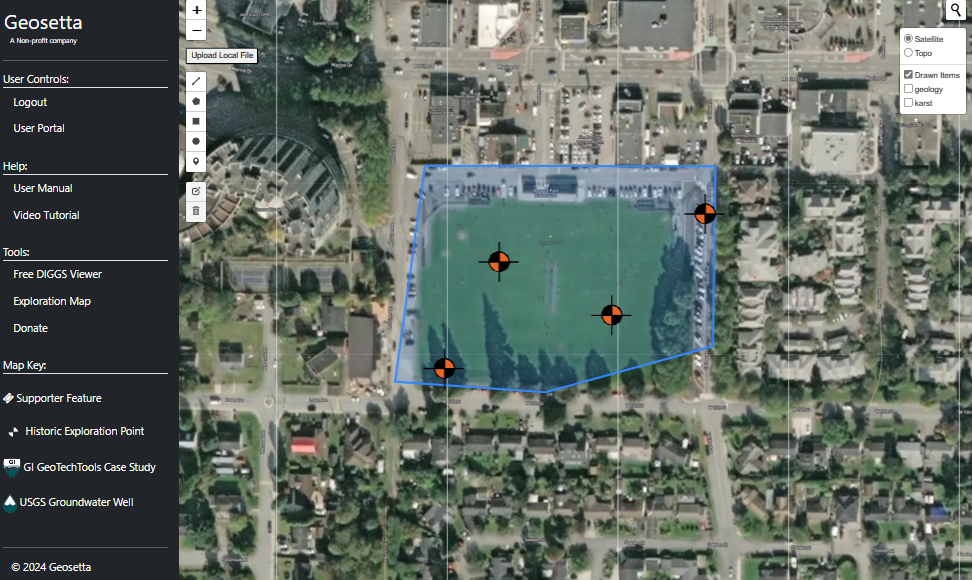
  api_key = "your_api_key_here"

  # Your payload and API key
  json_payload = {
      "deliverableType": "Project_Link",
      "data": {
    "type": "FeatureCollection",
    "features": [
      {
        "type": "Feature",
        "geometry": {
          "coordinates": [
            [
              [
                -123.119842,
                49.323426
              ],
              [
                -123.117503,
                49.323421
              ],
              [
                -123.117524,
                49.322477
              ],
              [
                -123.118871,
                49.322239
              ],
              [
                -123.120083,
                49.322294
              ],
              [
                -123.119842,
                49.323426
              ]
            ]
          ],
          "type": "Polygon"
        },
        "properties": {
          "Project Title": "RSLog Example Project #1 (Imperial) ",
          "Project Number": "EX20-001",
          "Client": "ABC Client Company Ltd."
        }
      },
      {
        "type": "Feature",
        "geometry": {
          "coordinates": [
            -123.11768,
            49.32323
          ],
          "type": "Point"
        },
        "properties": {
          "Name": "AH20-4a",
          "Depth": "13 ft",
          "Groundwater Depth": "",
          "Project Ref.": "RSLog Example Project #1 (Imperial)  (EX20-001)"
        }
      },
      {
        "type": "Feature",
        "geometry": {
          "coordinates": [
            -123.11934,
            49.32298
          ],
          "type": "Point"
        },
        "properties": {
          "Name": "testy",
          "Depth": "1 ft",
          "Groundwater Depth": "",
          "Project Ref.": "RSLog Example Project #1 (Imperial)  (EX20-001)"
        }
      },
      {
        "type": "Feature",
        "geometry": {
          "coordinates": [
            -123.11843,
            49.3227
          ],
          "type": "Point"
        },
        "properties": {
          "Name": "AH21-01",
          "Depth": "38.5 ft",
          "Groundwater Depth": "",
          "Project Ref.": "RSLog Example Project #1 (Imperial)  (EX20-001)"
        }
      },
      {
        "type": "Feature",
        "geometry": {
          "coordinates": [
            -123.11978,
            49.32242
          ],
          "type": "Point"
        },
        "properties": {
          "Name": "AH20-3",
          "Depth": "30 ft",
          "Groundwater Depth": "16.2 ft",
          "Project Ref.": "RSLog Example Project #1 (Imperial)  (EX20-001)"
        }
      }
    ]
  }
  }


  # Make the request
  response = requests.post(
      "https://geosetta.org/web_map/api_key/",
      json={
          "json_data": json.dumps(json_payload)  # Encode the dictionary as a JSON string
      },
      headers={
          "Authorization": f"Bearer {api_key}"  # Set the API key in the Authorization header
      }
  )

  # Check the response
  if response.status_code == 200:
      print("API request successful:")
      print(response.json())
  else:
      print("API request failed:")
      print(f"Status code: {response.status_code}")
      print(response.text)
The server will respond with a JSON object like this:
{'message': 'Data processed successfully.', 'results': 'https://geosetta.org/web_map/map/jqM826', 'disclaimer': 'The information made available through Geosetta has been compiled from various DOTs, public agencies, contributing data providers, and publicly available sources. The predictive models presented herein are based on machine learning tools applied to the data. The predicted subsurface conditions are a probabilistic model and do not depict the actual conditions at the site. No claim as to the accuracy of the data and predictive model is made or implied. No other representation, expressed or implied, is included or intended and no warranty or guarantee is included or intended in any Geosetta data or models. The User understands these limitations and that Geosetta is a tool for planning subsurface investigations and not a substitute for it. The User shall not redistribute, republish, or otherwise provide Geosetta predictions, models, or data outputs to any third party unless such outputs are accompanied by these same limitations and this disclaimer in full. In no event shall Geosetta or the Data Owners be liable to the User or another Party for any incidental, consequential, special, exemplary or indirect damages, lost business profits or lost data arising out of or in any way related to the use of information or data obtained from the Geosetta.org website or API.'}
API endpoint retrieves the distance from a pre-trained point. It's important to note that not all data on Geosetta has been included in the training process. Therefore, the distance provided is relative to the nearest location that has been used in our training dataset.
  api_key = "your_api_key_here"

  # Your payload and API key
  json_payload = {
      "deliverableType": "Distance_From_Trained_Point",
      "data": {
          "points": [
              {
                  "latitude":   39.387080,
                  "longitude": -76.813480,
                  "depth": 50
              },
              {
                  "latitude": 39.4,
                  "longitude": -76.8,
                  "depth": 30
              }
          ]
      }
  }


  # Make the request
  response = requests.post(
      "https://geosetta.org/web_map/api_key/",
      json={
          "json_data": json.dumps(json_payload)  # Encode the dictionary as a JSON string
      },
      headers={
          "Authorization": f"Bearer {api_key}"  # Set the API key in the Authorization header
      }
  )

  # Check the response
  if response.status_code == 200:
      print("API request successful:")
      print(response.json())
  else:
      print("API request failed:")
      print(f"Status code: {response.status_code}")
      print(response.text)
The server will respond with a JSON object like this:
{'message': 'Data processed successfully.', 'results': {'minimum_distance_from_trained_point_(mi)': 2.13}, 'disclaimer': 'The information made available through Geosetta has been compiled from various DOTs, public agencies, contributing data providers, and publicly available sources. The predictive models presented herein are based on machine learning tools applied to the data. The predicted subsurface conditions are a probabilistic model and do not depict the actual conditions at the site. No claim as to the accuracy of the data and predictive model is made or implied. No other representation, expressed or implied, is included or intended and no warranty or guarantee is included or intended in any Geosetta data or models. The User understands these limitations and that Geosetta is a tool for planning subsurface investigations and not a substitute for it. The User shall not redistribute, republish, or otherwise provide Geosetta predictions, models, or data outputs to any third party unless such outputs are accompanied by these same limitations and this disclaimer in full. In no event shall Geosetta or the Data Owners be liable to the User or another Party for any incidental, consequential, special, exemplary or indirect damages, lost business profits or lost data arising out of or in any way related to the use of information or data obtained from the Geosetta.org website or API.'}
API endpoint to convert a pdf boring log to a DIGGS file.
  import requests
  import json

  api_key = "your_api_key_here"

  # Example PDF file path
  pdf_file_path = '/content/example_boring_log.pdf'

  # Your payload and API key
  json_payload = {
      "deliverableType": "Pdf_Extraction",
      "data": {
      }
  }

  # Make the request
  with open(pdf_file_path, 'rb') as pdf_file:
      response = requests.post(
          "https://geosetta.org/web_map/api_key/",
          files={'file': pdf_file},
          data={
              'json_data': json.dumps(json_payload)
          },
          headers={
              "Authorization": f"Bearer {api_key}"  # Set the API key in the Authorization header
          }
      )

  # Check the response
  if response.status_code == 200:
      print("API request successful:")
      # Save the zip file content to a file
      zip_file_path = '/content/processed_results.zip'
      with open(zip_file_path, 'wb') as zip_file:
          zip_file.write(response.content)
      print(f"Zip file saved to {zip_file_path}")
  else:
      print("API request failed:")
      print(f"Status code: {response.status_code}")
      print(response.text)
The server will respond with a JSON object like this:
  API request successful:
  Zip file saved to /content/processed_results.zip
🆕 VLM Extraction Issue Reporting API
Report incorrect VLM boring log extractions to help improve model accuracy. When the extraction service misreads values — wrong blow counts, shifted depths, missing layers — submit a report with the page images and extraction data. Reports are stored as training examples and used to fine-tune future model versions.
Issue reports can also be submitted directly from the Boring Log Extractor web interface using the Report Issue button next to each boring.
POST /api/vlm/report
Submit an issue report for an incorrect extraction. Attach the page image(s) for the boring and the per-page extraction JSON that the model produced. Use the same X-API-Key you used for the original extraction request.
Authentication: Required — X-API-Key header must be provided.
Request: multipart/form-data
| Parameter | Type | Required | Default | Description |
|---|---|---|---|---|
images |
File(s) (PNG) | Yes | — | One or more page images, named page_{N}.png where N is the page number (max 20MB each) |
extraction_jsons |
string (JSON) | Yes | — | JSON object mapping page numbers to their extraction results: {"5": {...}, "6": {...}} |
description |
string | No | — | Description of what's wrong with the extraction |
boring_id |
string | No | — | Boring ID being reported (e.g. B-1) |
filename |
string | No | — | Original PDF filename |
Example Request (Python):
import requests
import json

api_key = "your_api_key_here"

# Page images and extraction data from a previous /vlm/extract call
page_images = {
    5: open("pages/B-1_page_5.png", "rb").read(),
    6: open("pages/B-1_page_6.png", "rb").read(),
}

extraction_data = {
    "5": {"results": {"point_info": [{"boring_id": "B-1"}], "samples_spt": [...]}},
    "6": {"results": {"samples_spt": [...], "lithology": [...]}},
}

# Submit the report
response = requests.post(
    "https://diggs.geosetta.org/api/vlm/report",
    headers={"X-API-Key": api_key},
    files=[
        ("images", ("page_5.png", page_images[5], "image/png")),
        ("images", ("page_6.png", page_images[6], "image/png")),
    ],
    data={
        "extraction_jsons": json.dumps(extraction_data),
        "description": "SPT N-values are shifted down one row — 15 at 5ft should be at 10ft",
        "boring_id": "B-1",
        "filename": "geotech_report.pdf",
    },
)

if response.status_code == 200:
    report = response.json()
    print(f"Report submitted: {report['report']['report_id']}")
else:
    print(f"Error: {response.status_code}")
    print(response.text)
Example Request (cURL):
curl -X POST "https://diggs.geosetta.org/api/vlm/report" \
  -H "X-API-Key: YOUR_API_KEY" \
  -F "images=@pages/page_5.png" \
  -F "images=@pages/page_6.png" \
  -F 'extraction_jsons={"5": {"results": {}}, "6": {"results": {}}}' \
  -F "description=SPT N-values shifted down one row" \
  -F "boring_id=B-1" \
  -F "filename=geotech_report.pdf"
Response:
{
    "status": "created",
    "report": {
        "report_id": "20260316_022326_f637b054",
        "api_key_prefix": "lZnSEWjt...",
        "boring_id": "B-1",
        "filename": "geotech_report.pdf",
        "description": "SPT N-values are shifted down one row — 15 at 5ft should be at 10ft",
        "pages": [5, 6],
        "has_correction": false,
        "created_at": "2026-03-16T02:23:26.804417+00:00"
    }
}
Error Responses:
| Status Code | Condition |
|---|---|
400 |
Missing images, invalid extraction_jsons JSON, image too large (>20MB), page number mismatch between images and JSON keys |
401 |
Missing or invalid API key |
403 |
Invalid API key or no credits remaining |
PATCH /api/vlm/reports/{report_id}
Add or update a corrected JSON for a previously submitted report. Only the original submitter (matching API key) can update a report.
Authentication: Required — X-API-Key header must be provided (must match the key used to create the report).
Request: multipart/form-data
| Parameter | Type | Required | Description |
|---|---|---|---|
report_id |
string (path) | Yes | The report ID returned from POST /api/vlm/report |
corrected_json |
string (JSON) | Yes | The corrected extraction data |
Example Request (Python):
import requests
import json

api_key = "your_api_key_here"
report_id = "20260316_022326_f637b054"

corrected = {
    "point_info": [{"boring_id": "B-1", "total_depth": "50 ft"}],
    "samples_spt": [
        {"depth_top": "5.0", "depth_bottom": "6.5", "n_value": "15"},
        {"depth_top": "10.0", "depth_bottom": "11.5", "n_value": "22"}
    ]
}

response = requests.patch(
    f"https://diggs.geosetta.org/api/vlm/reports/{report_id}",
    headers={"X-API-Key": api_key},
    data={"corrected_json": json.dumps(corrected)},
)

if response.status_code == 200:
    print("Correction submitted successfully")
else:
    print(f"Error: {response.status_code}")
    print(response.text)
Example Request (cURL):
curl -X PATCH "https://diggs.geosetta.org/api/vlm/reports/20260316_022326_f637b054" \
  -H "X-API-Key: YOUR_API_KEY" \
  -F 'corrected_json={"point_info": [{"boring_id": "B-1"}], "samples_spt": [...]}'
Response:
{
    "status": "updated",
    "report": {
        "report_id": "20260316_022326_f637b054",
        "api_key_prefix": "lZnSEWjt...",
        "boring_id": "B-1",
        "filename": "geotech_report.pdf",
        "description": "SPT N-values are shifted down one row",
        "pages": [5, 6],
        "has_correction": true,
        "corrected_json": "{...}",
        "status": "new",
        "created_at": "2026-03-16T02:23:26.804417+00:00"
    }
}
Error Responses:
| Status Code | Condition |
|---|---|
401 |
Missing or invalid API key |
404 |
Report not found, or API key does not match the original submitter |
GET /api/vlm/reports/{report_id}
Retrieve a single report including metadata and per-page extraction JSONs.
Authentication: Required — X-API-Key header must be provided.
Example Request (cURL):
curl "https://diggs.geosetta.org/api/vlm/reports/20260316_022326_f637b054" \
  -H "X-API-Key: YOUR_API_KEY"
Response:
{
    "report_id": "20260316_022326_f637b054",
    "api_key_prefix": "lZnSEWjt...",
    "boring_id": "B-1",
    "filename": "geotech_report.pdf",
    "description": "SPT N-values are shifted down one row",
    "pages": [5, 6],
    "page_extractions": {
        "5": "{\"results\": {\"point_info\": [{\"boring_id\": \"B-1\"}]}}",
        "6": "{\"results\": {\"samples_spt\": [{\"depth\": \"10\"}]}}"
    },
    "has_correction": false,
    "corrected_json": null,
    "status": "new",
    "created_at": "2026-03-16T02:23:26.826979+00:00"
}
Response Fields:
| Field | Type | Description |
|---|---|---|
report_id |
string | Unique report identifier |
pages |
array | Page numbers included in this report |
page_extractions |
object | Map of page number → raw extraction JSON string |
has_correction |
boolean | Whether a corrected JSON has been submitted |
corrected_json |
string or null | The corrected data, if submitted via PATCH |
status |
string | new, reviewed, training, or resolved |
Seismic Site Class Prediction (ASCE 7-22)
Predict the ASCE 7-22 seismic site class at any location in the continental US. The endpoint runs Geosetta's ML models to predict soil type and SPT N-values at 1-ft intervals from 0–100 ft, converts to shear wave velocity (Vs) using the Imai & Tonouchi (1982) correlation, computes VS30 via harmonic averaging, and assigns a site class ranging from A (hard rock) to E (soft soil).
Results include lower and upper bound site classes derived from the predicted N-value category ranges, plus a per-depth confidence score based on proximity to training data, geological context, and model agreement.
GET /web_map/api/site_class/<lat>/<lng>/
Authentication: Required — X-API-Key header or session login.
Rate Limit: Subject to the per-API-key daily quota (see Rate Limits & Quotas). Returns HTTP 429 when the quota is exceeded.
| Parameter | Type | Description |
|---|---|---|
lat |
float | Latitude (decimal degrees) |
lng |
float | Longitude (decimal degrees) |
Example Request (Python):
import requests

response = requests.get(
    "https://geosetta.org/web_map/api/site_class/38.307/-82.046/",
    headers={"X-API-Key": "your_api_key_here"}
)

data = response.json()
print(f"Site Class: {data['site_class']['lower_bound']} - {data['site_class']['upper_bound']}")
print(f"VS30: {data['vs30_ft_s']['average']} ft/s")
print(f"Confidence: {data['confidence']['average_percent']}%")
Example Request (cURL):
curl -H "X-API-Key: your_api_key_here" \
  "https://geosetta.org/web_map/api/site_class/38.307/-82.046/"
Example Response:
{
  "status": "success",
  "location": {
    "latitude": 38.307,
    "longitude": -82.046,
    "elevation_ft": 892.5,
    "formation": "Kanawha Formation",
    "soil_type": "Silt loam"
  },
  "site_class": {
    "lower_bound": "D",
    "upper_bound": "CD",
    "standard": "ASCE 7-22"
  },
  "vs30_ft_s": {
    "lower_bound": 723.45,
    "upper_bound": 1102.33,
    "average": 912.89
  },
  "profile": {
    "depth_ft": [0, 1, 2, "...", 100],
    "soil_type": ["CLAY", "CLAY", "SILT", "..."],
    "n_value_category": ["1-9", "1-9", "10-25", "..."],
    "n_lower": [1, 1, 10, "..."],
    "n_upper": [9, 9, 25, "..."],
    "vs_lower_ft_s": [318.37, 318.37, 636.12, "..."],
    "vs_upper_ft_s": [637.21, 637.21, 922.45, "..."]
  },
  "confidence": {
    "average_percent": 62,
    "per_depth": [65, 64, 63, "..."]
  },
  "disclaimer": "The information made available through Geosetta has been compiled from various DOTs, public agencies, contributing data providers, and publicly available sources. The predictive models presented herein are based on machine learning tools applied to the data. The predicted subsurface conditions are a probabilistic model and do not depict the actual conditions at the site. No claim as to the accuracy of the data and predictive model is made or implied. No other representation, expressed or implied, is included or intended and no warranty or guarantee is included or intended in any Geosetta data or models. The User understands these limitations and that Geosetta is a tool for planning subsurface investigations and not a substitute for it. The User shall not redistribute, republish, or otherwise provide Geosetta predictions, models, or data outputs to any third party unless such outputs are accompanied by these same limitations and this disclaimer in full. In no event shall Geosetta or the Data Owners be liable to the User or another Party for any incidental, consequential, special, exemplary or indirect damages, lost business profits or lost data arising out of or in any way related to the use of information or data obtained from the Geosetta.org website or API."
}
Response Fields:
| Field | Description |
|---|---|
site_class.lower_bound |
Site class from lower-bound N-values (conservative) |
site_class.upper_bound |
Site class from upper-bound N-values |
vs30_ft_s |
Time-averaged shear wave velocity over top 100 ft (ft/s) |
profile.depth_ft |
Depth array (0–100 ft at 1 ft intervals) |
profile.soil_type |
Predicted soil type at each depth (CLAY, SAND, SILT, GRAVEL, ROCK) |
profile.n_value_category |
Predicted SPT N-value range at each depth |
profile.vs_lower_ft_s / vs_upper_ft_s |
Shear wave velocity bounds at each depth (Imai & Tonouchi 1982) |
confidence.average_percent |
Overall prediction confidence (0–100) |
Notes:
- Site classes follow ASCE 7-22 with intermediate classes (BC, CD, DE)
- VS30 is computed using harmonic averaging over the full 100 ft profile
- N-to-Vs conversion uses Imai & Tonouchi (1982): Vs = 97 × N0.314 × 3.281 ft/s
- Refusal rule: if predicted N ≥ 50 at any depth, all deeper layers are set to N=100
- Confidence scores factor in distance to nearest training data, data density, geological context, model probability, and tree agreement
Vector Tiles — Borehole Data Streaming
Stream Geosetta's full borehole dataset (~500,000 points) into any mapping application using Mapbox Vector Tiles (MVT). This is the most efficient way to display Geosetta data in your own maps — the client only downloads visible tiles, and the binary protobuf format is far smaller than GeoJSON.
Compatible with: MapLibre GL JS, Mapbox GL JS, Deck.gl, QGIS, ArcGIS Online, Leaflet (via plugins), and any client that supports the MVT specification.
GET /web_map/tiles/{z}/{x}/{y}.pbf
Authentication: Required — API key via query parameter or Authorization header.
Rate Limit: Throttled per API key (see Rate Limits & Quotas). Tiles are cached, so normal map browsing stays well within the limit.
URL Pattern:
https://geosetta.org/web_map/tiles/{z}/{x}/{y}.pbf?api_key=YOUR_API_KEY
For map clients that set tile URLs as templates, append ?api_key=YOUR_API_KEY to the URL. Alternatively, pass Authorization: Bearer YOUR_API_KEY in request headers (supported by MapLibre GL JS via transformRequest).
| Parameter | Type | Description |
|---|---|---|
z |
integer (0–22) | Zoom level |
x |
integer | Tile column |
y |
integer | Tile row |
cluster_max_zoom |
integer (0–14), optional | Query parameter. Zoom levels below this value return server-side clusters; levels at or above it return individual points. Defaults to 8. Raise it (e.g. 11) if points are still too dense for your map at mid zooms — just append it to your tile URL template. |
Tile Contents:
Each tile contains a single vector layer named boreholes with the following properties:
| Property | Type | Feature kind | Description |
|---|---|---|---|
fk |
string | point | Functional key (lat;lon) — use to query detailed data |
src |
string | point | Data provider (e.g. VDOT, MDOT). Enumerate valid values with GET /api/providers/ |
t |
string | point | trained or untrained |
cnt |
integer | cluster | Cluster point count |
tcnt |
integer | cluster | Trained point count within cluster |
At zoom levels below cluster_max_zoom (default 8), points are server-side clustered for performance; at or above it, individual borehole points are returned. Additionally, any tile that would contain more than 10,000 raw points is served clustered regardless of zoom, so a single tile can never balloon to hundreds of thousands of features in dense metro areas.
Styling tip: because a dense tile can be clustered even at high zoom, distinguish clusters from points by property presence rather than zoom alone: cluster features have cnt, individual points have fk (see the MapLibre example below).
Caching: tiles are cached server-side for 1 hour and served with Cache-Control: public, max-age=3600, so your browser or proxy can reuse tiles instead of re-requesting them — repeated pans over the same area do not burn through your rate limit.
Example: MapLibre GL JS
var apiKey = 'YOUR_API_KEY';

// Add Geosetta borehole data as a vector tile source.
// Optionally append &cluster_max_zoom=11 to keep clustering through mid zooms.
map.addSource('geosetta-boreholes', {
    type: 'vector',
    tiles: ['https://geosetta.org/web_map/tiles/{z}/{x}/{y}.pbf?api_key=' + apiKey],
    minzoom: 0,
    maxzoom: 16
});

// Render individual boreholes (features with an 'fk' property)
map.addLayer({
    id: 'boreholes-points',
    type: 'circle',
    source: 'geosetta-boreholes',
    'source-layer': 'boreholes',
    filter: ['has', 'fk'],
    paint: {
        'circle-radius': 5,
        'circle-color': ['match', ['get', 't'],
            'trained', '#2ecc71',
            'untrained', '#e67e22',
            '#999999'
        ],
        'circle-stroke-width': 1,
        'circle-stroke-color': '#ffffff'
    }
});

// Render clusters (features with a 'cnt' property)
map.addLayer({
    id: 'boreholes-clusters',
    type: 'circle',
    source: 'geosetta-boreholes',
    'source-layer': 'boreholes',
    filter: ['has', 'cnt'],
    paint: {
        'circle-radius': ['step', ['get', 'cnt'],
            8, 10, 12, 50, 16, 200, 22
        ],
        'circle-color': '#3498db',
        'circle-opacity': 0.7
    }
});

// Click handler: fetch detailed data on click
map.on('click', 'boreholes-points', function(e) {
    var props = e.features[0].properties;
    var fk = props.fk;  // e.g. "37.658736;-78.124825"
    var parts = fk.split(';');

    // Fetch full borehole details from Geosetta
    fetch('https://geosetta.org/web_map/get-point-info/?lat=' +
          parts[0] + '&lng=' + parts[1])
        .then(r => r.json())
        .then(data => {
            new maplibregl.Popup()
                .setLngLat(e.lngLat)
                .setHTML('<b>' + props.src + '</b><br>' + fk)
                .addTo(map);
        });
});
Example: QGIS
Add a vector tile layer via Layer → Add Layer → Add Vector Tile Layer:
URL: https://geosetta.org/web_map/tiles/{z}/{x}/{y}.pbf?api_key=YOUR_API_KEY
Min Zoom: 0
Max Zoom: 16
Example: Python (requests)
import requests

api_key = "your_api_key_here"

# Fetch a single tile (zoom 12, covering central Virginia)
response = requests.get(
    "https://geosetta.org/web_map/tiles/12/1153/1585.pbf",
    headers={"Authorization": f"Bearer {api_key}"}
)

print(f"Tile size: {len(response.content)} bytes")
print(f"Content-Type: {response.headers['Content-Type']}")
# Parse with mapbox-vector-tile library:
# pip install mapbox-vector-tile
import mapbox_vector_tile
tile_data = mapbox_vector_tile.decode(response.content)
boreholes = tile_data.get('boreholes', {}).get('features', [])
print(f"Boreholes in tile: {len(boreholes)}")
Performance Notes:
- Tiles are cached for 1 hour server-side
- Typical tile size: 1–10 KB (vs. 100+ KB for equivalent GeoJSON)
- CORS headers included — works from any origin
- API key required — pass via
?api_key=orAuthorization: Bearerheader - Tiles include both trained and untrained boreholes
Combining with Other Geosetta APIs:
Vector tiles provide the spatial index — use the fk (functional key) from tile features to query detailed data via other Geosetta endpoints:
- Borehole details (JSON):
GET /web_map/get-point-info/?lat={lat}&lng={lng}— accepts API key - Raw DIGGS XML:
GET /web_map/diggs_xml/{fk}— bareapplication/xml, accepts API key - AGS4 download:
GET /web_map/downloadAGS/{fk}— accepts API key - PDF file list (JSON):
GET /web_map/do_files_json/{fk}/— accepts API key - Borehole log viewer (HTML):
GET /web_map/generateDIGGS/{fk} - Predictions at location:
GET /web_map/BoreholePred/{lat}/{lon}
Data Providers & Test Types
GET /api/providers/
Public — no API key required. Lists every data provider in Geosetta with record counts. The provider value is exactly the src property emitted by Vector Tiles, so use this endpoint to discover valid values before filtering tile features by provider.
import requests

response = requests.get("https://geosetta.org/api/providers/")
for p in response.json()["providers"]:
    print(f"{p['provider']}: {p['borings']:,} borings, "
          f"{p['untrained_locations']:,} untrained locations")
Response fields: provider (string, matches the tile src property), borings (fully parsed borings), untrained_locations (report locations not yet parsed into structured data). Results are cached server-side for 24 hours and rate-limited per IP.
The spt_type field
Borehole records carry a spt_type field describing the exploration/test method. It appears in GeoJSON polygon exports, per-boring detail responses, and drives the CPT and MWD icons on the map. It is free text taken verbatim from each provider — there are hundreds of variants, so never filter by exact match. Common families:
| Family | Example values | Recommended match |
|---|---|---|
| CPT (cone penetration) | CPT, Cone Penetration Testing (CPT) |
case-insensitive contains cpt or cone pen |
| SPT (standard penetration) | SPT, Standard, Standard Penetration Test, 3.25" HSA w/ SPTs |
contains spt or standard |
| MWD (measurement while drilling) | MWD, Measurement While Drilling (MWD) |
contains mwd |
| Rock core | Diamond Core, NX Core Drill, Rock Core |
contains core |
Why this matters: CPT soundings have no blow counts — their equivalent_n60 values are correlations, not measured SPT N-values. If your analysis needs measured SPT data only (e.g. liquefaction triggering), exclude records whose spt_type matches the CPT family above.
Bulk & research datasets: interactive and API responses are capped at site-scale result counts by design. If you need a full dataset for research, contact us — we provide bulk extracts on request.